
Azure Resiliency Agent for data platforms (2/3): tested on a fragile data platform

In part 1 I explained what the Azure Copilot Resiliency Agent is: a chat front end for Infrastructure Resiliency Manager that checks one kind of resilience, the loss of an availability zone.
Now Tom wants to know whether it is worth turning on. I put the agent on a small, deliberately fragile data platform to see what it finds, what it gets wrong and what it costs.
- It found the real gaps: both storage accounts and the function app's plan are not zone resilient, Event Hubs is.
- It reads Azure Resource Graph. If that data is stale, the agent is wrong too. Mine reported a database that does not exist.
- Without context it gave wrong advice for the Flex Consumption plan. With the plan type in the prompt, the answer was correct.
- Review the generated code: my Terraform was missing a setting that matters.
- Goals, posture and recommendations are free without a usage plan. Drills and recovery plans cost money from December 1, 2026.
- What it is and where it stops
- Tested on a fragile data platform (this post)
- Resilience as code in the terminal
Demo: a fragile data platform
I built a small platform with Terraform and left out zone redundancy on purpose:
The table lists each deliberate weakness and what I expected from the docs. LRS is locally redundant storage, ZRS is zone-redundant storage.
| Resource | Deliberate weakness | Expected from the docs |
|---|---|---|
| Azure Data Lake Storage (ADLS) Gen2 | LRS instead of ZRS | Non zone-resilient, fix: ZRS |
| Function storage | LRS instead of ZRS | Non zone-resilient |
| Azure Functions (Flex Consumption) | zone redundancy off | Non zone-resilient |
| Event Hubs | none, it is a control | Zone resilient in all tiers |
| Azure Databricks workspace | managed storage on LRS | Not on the support list |
| Key Vault | none | Not on the support list |
The first draft also had a PostgreSQL Flexible Server. My subscription got SkuNotAvailable for the Burstable SKUs in the region, so I removed it from the code. Remember this.
A service group with criticality Tier 0 holds the resource group. I created it with Terraform, so I skipped the agent's service group creation.
Step 1: Discover the application
I asked the agent to discover all application resources in the resource group and chose automatic application discovery.
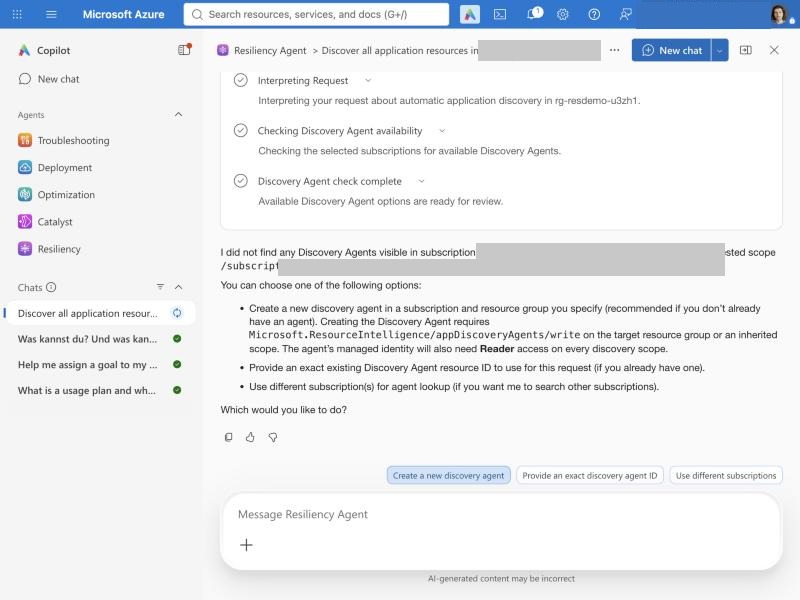
Discovery needs a discovery agent, which is an Azure resource (Microsoft.ResourceIntelligence/appDiscoveryAgents) with its own managed identity.
I stopped here. My service group already existed, and creating an identity with Reader rights is a decision you make on purpose, not in passing.
Step 2: Find the weak spots
Get the zonal resiliency posture of my service group.
The agent found the service group but no posture data. The goal I had assigned earlier in the portal was stuck.
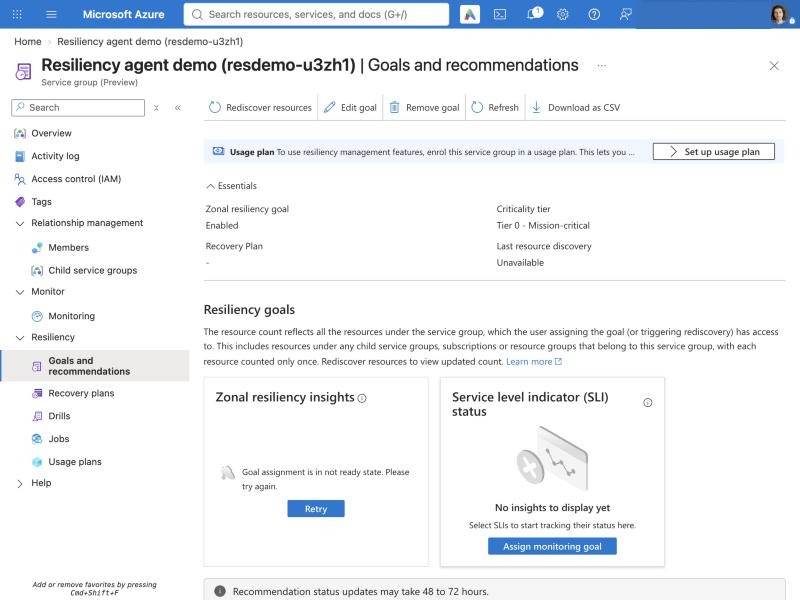
Retry opened the goal wizard again, and that failed too: another PUT operation on the goal assignment was still in progress.
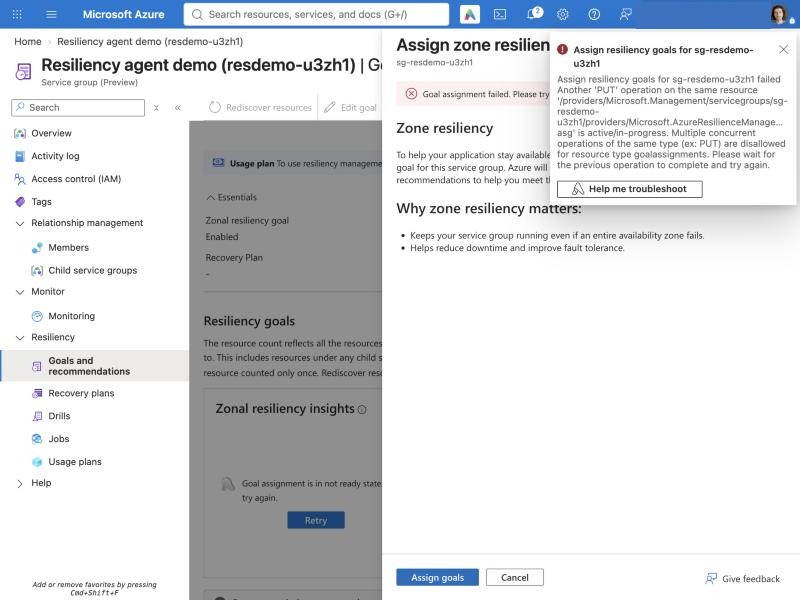
This is a preview. So I asked at resource level instead:
Check the zonal resiliency of every resource in <resource group ID> and show the result as a table.
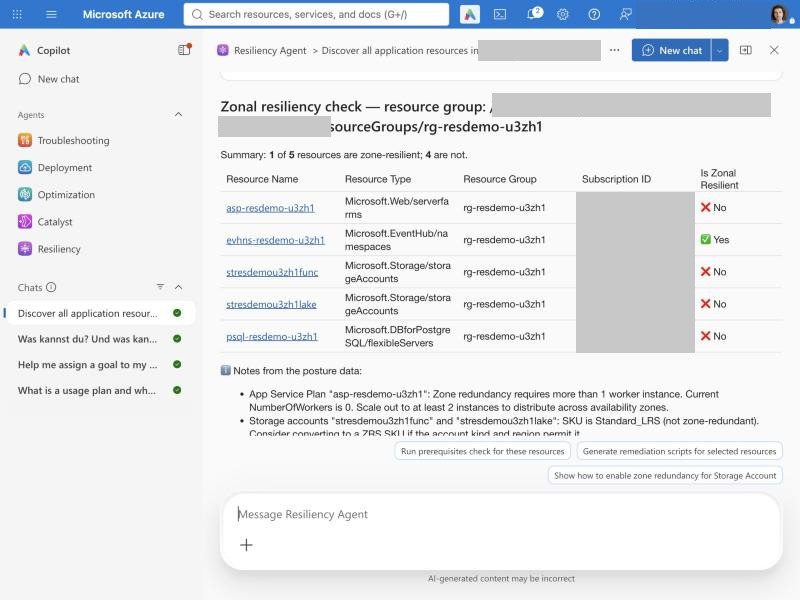
Compared with my expectations:
- Right: both storage accounts and the function app's plan are non zone-resilient. Event Hubs, the control, is resilient.
- Missing: Key Vault and Azure Databricks. They are not supported resource types, so they are not evaluated. The agent did not say that. It left them out.
- Wrong:
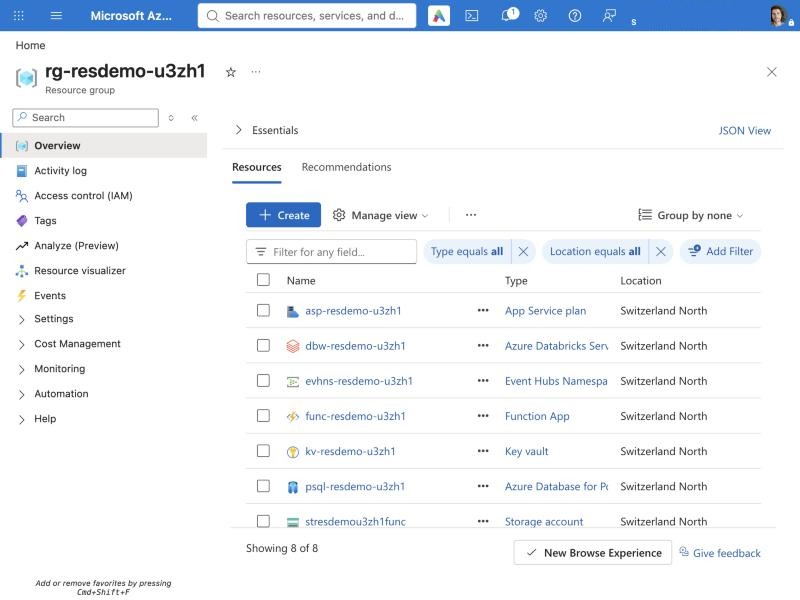
psql-resdemo-..., a PostgreSQL Flexible Server, non zone-resilient. The portal lists this server, but it does not exist.
The resource group list shows it, and the PostgreSQL list even shows it with version 16 and the status "Dropping":
Opening it returns a 404:
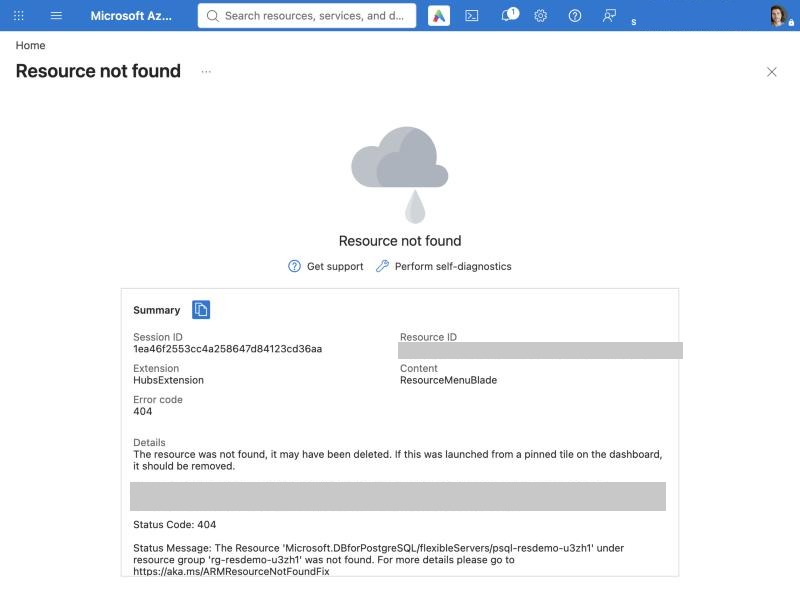
The failed deployment left a ghost entry in Azure Resource Graph. The agent reads Resource Graph, so it reported the ghost as a real gap and later even ranked it as the second most important fix. This is a known limitation from the transparency FAQ, live: "Missing, stale, or incomplete metadata can affect assessments and recommendations." Check the resource before you act on a finding.
Step 3: Recommendations and cost hints
What should I fix first? Include the cost impact for each item.
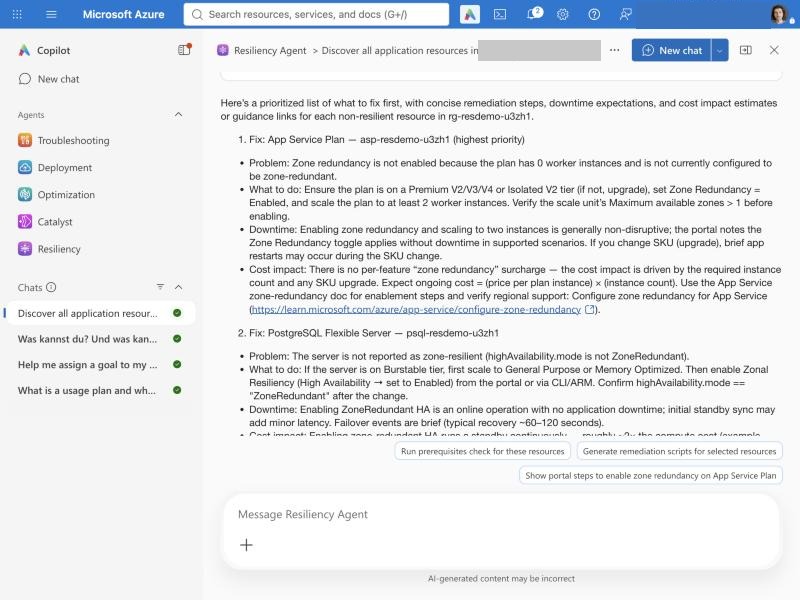
The order made sense: compute first, then the database, then storage, because storage can need a migration or a long-running conversion. But the advice for the function app's plan was wrong. It told me to move the plan to Premium V2, V3, V4 or Isolated V2. My plan is Flex Consumption, and Flex Consumption supports zone redundancy itself. The agent treated it like a classic App Service plan.
The portal shows recommendations with a qualitative cost indicator: High, Medium, Low or no cost impact. In chat, the agent went further and gave a rough example for PostgreSQL high availability:
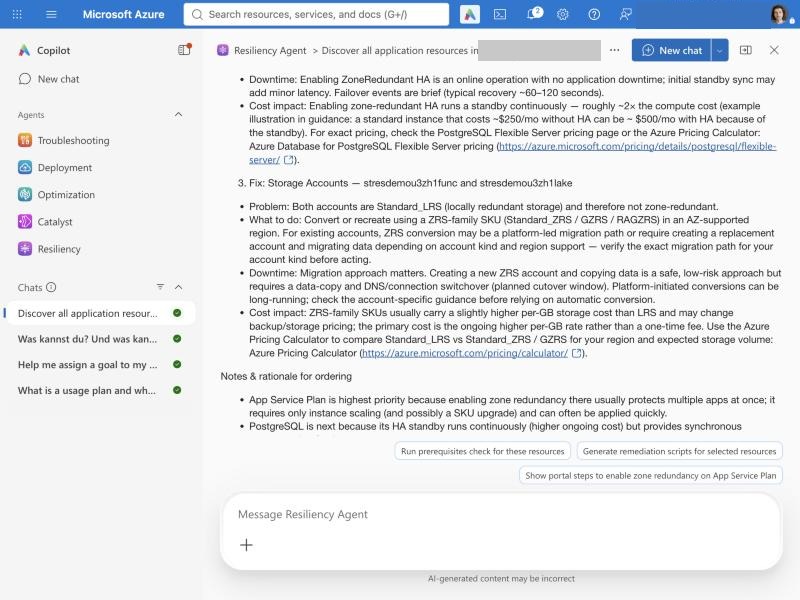
That example is generic. It is not based on my SKUs or my region, and the server does not even exist.
Step 4: Check the prerequisites
What are the prerequisites to make my function app zone resilient? It runs on a Flex Consumption plan.
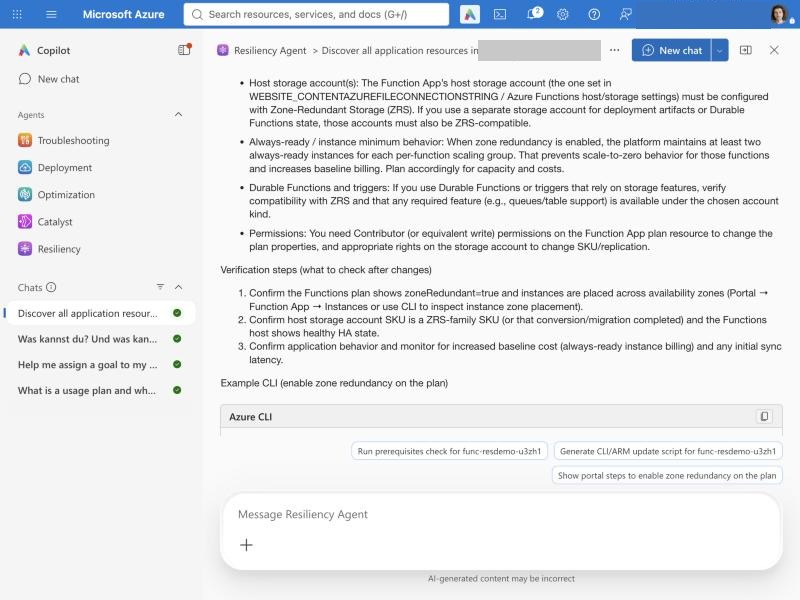
With the plan type in the prompt, the answer was correct and matched Microsoft Learn:
- the host storage account and the deployment storage must be ZRS first
- the platform keeps at least two always-ready instances per scaling group, so the app no longer scales to zero
- there is no separate meter for zone redundancy, but the always-ready instances cost money
- enabling it restarts the app
The agent does not always read the details of your resources, so give it the context. The FAQ says the same: "Provide relevant architecture and resilience requirements."
Step 5: Generate code instead of fixing in place
The agent can apply some fixes directly after you confirm. I did not try that.
In a professional environment, every change goes through code, review and the pipeline. A portal click that is not in code is drift, and the next terraform apply either reverts it or fails.
So I asked for code:
Give me Terraform to enable zonal resiliency for the storage account <name>. The account already exists and is managed with the azurerm provider 4.x.
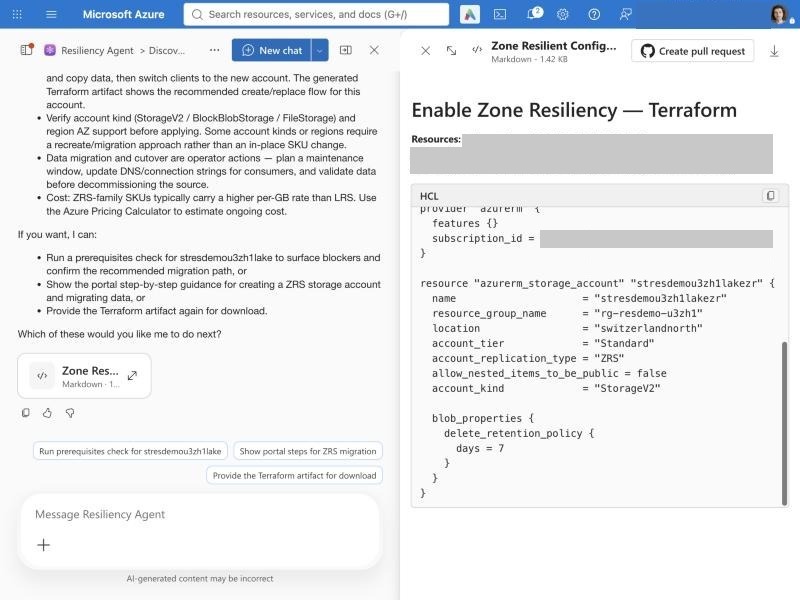
The artifact has a Create pull request button, which points in the right direction. The code itself needs work:
- It creates a new account (
...lakezr) and tells you to copy the data. But LRS to ZRS works as a conversion in place, also for accounts with hierarchical namespace, with a pause of less than 30 seconds. - It drops
is_hns_enabled = true. The new account would be a plain blob account, not ADLS Gen2. Your Databricks paths would break. - It ignores what I said. I asked for azurerm 4.x, it wrote
>= 3.0. It hardcodes the subscription ID in the provider block. Tags and minimum TLS version are gone.
For a lakehouse, the better change is one line in the existing resource, after you check the conversion rules:
resource "azurerm_storage_account" "lake" {
  # ... unchanged ...
  account_replication_type = "ZRS" # was "LRS"
  is_hns_enabled           = true
}
I have not applied this yet. Run terraform plan first and check whether your provider version converts in place or wants to replace the account. A replace on a data lake is not a change you want to discover in production.
Part 3 runs this plan on the code that the agent wrote in GitHub Copilot CLI.
Step 6: The Markdown report
You can download a readiness assessment as Markdown. The service does not store reports and cannot compare them with earlier ones. If you want a history, keep the files yourself. A folder in the platform repo works.
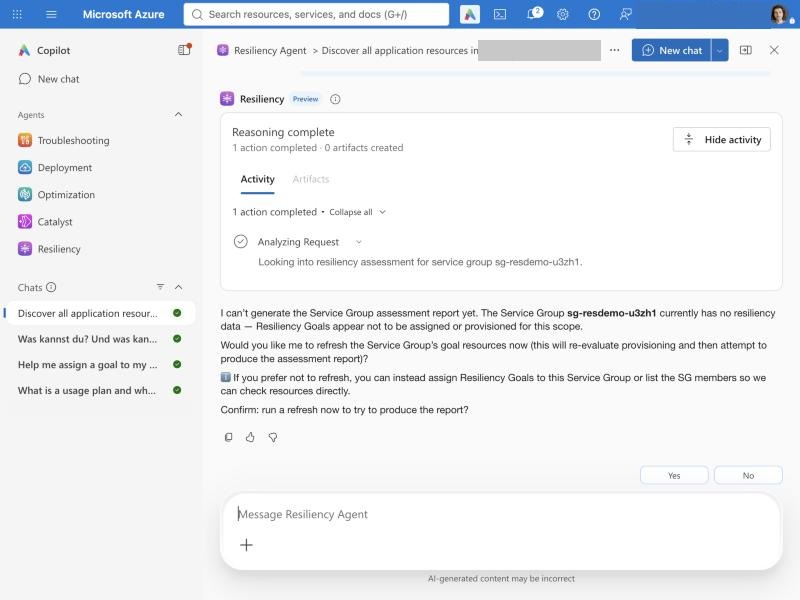
In my demo there was no report: the assessment needs the zone goal, and my goal was stuck. Before the agent refreshed the goal, it asked for confirmation. That is the human-in-the-loop control in practice:
My workflow: verify findings, fix in code
The FAQ lists operational factors for responsible use. After the demo, every one of them makes sense to me. As a workflow:
Drills, usage plans and what they cost
Finding weak spots is one thing. Proving that the platform survives a zone loss is another. Zone down drills cover the second part. They simulate a zone outage on your resources, powered by Azure Chaos Studio.
Before you get there, you need:
- the service group enrolled in a usage plan
- a service level indicator (SLI) or an Azure Monitor health model. The agent can attach an existing one but cannot create it
- a recovery plan if some resources need manual failover
- existing Azure Automation runbooks for custom faults. The agent does not write them
- the resource providers
Microsoft.Chaos,Microsoft.Insights,Microsoft.OperationalInsightsandMicrosoft.Automationregistered
The agent prepares the drill and checks readiness. You start the drill in the portal yourself.
If you have no SLI yet, start there. I wrote about SLIs, SLOs and SLAs earlier. Without one, a drill tells you that something broke, not whether your users noticed.
Goals stay free, drills and recovery plans need a usage plan
A usage plan only decides which subscription pays. It has no tiers. The table shows which capabilities need one.
| Capability | Usage plan needed | Cost |
|---|---|---|
| Goals, posture, recommendations | No | Free |
| Zone down drills | Yes | Paid from December 1, 2026 |
| Recovery orchestration plans | Yes | Paid from December 1, 2026 |
The billing rules are simple once you see them. A service group is billed per month when two things are true at the same time:
- it is enrolled in a usage plan, and
- it has at least one resiliency artifact: an assigned goal, a recovery plan or a drill.
Billing is hourly and prorated. Whether you run a drill does not matter. Having one is enough.
An example. A data platform has three service groups: ingestion, lakehouse and serving. All three have zone goals. Only the lakehouse group is enrolled in a usage plan, because the team wants to run drills there.
- Ingestion and serving: free. Goals without a usage plan cost nothing.
- Lakehouse: billed every month, as long as it stays enrolled.
- The team deletes the drill after testing but keeps the goal: still billed, because the goal counts as an artifact.
- To go back to the free features, remove the lakehouse group's enrollment from the usage plan.
At the time of writing, Microsoft had not published the monthly rate. The product page still says "no additional charge during the preview". Check it before you enroll. Your cost will be the number of enrolled service groups with at least one artifact times that monthly rate.
Cost of resilience versus cost of an outage
Every resilience discussion with the business ends with the same question: what will it cost?
The agent answers with High, Medium, Low or none, plus generic examples in chat. The ratings help you prioritize. They do not help you write a business case.
For real numbers you still need the Azure pricing calculator and a look at what changes: ZRS instead of LRS on storage, always-ready instances for the function app, a standby replica if you run a database with high availability.
But the cost of resilience is only half of the answer. The other half is the damage without it. That makes it a risk assessment: how big is the damage if a zone goes down and the platform is not ready? How long are the reports gone, how much data is lost, how many days does the team need to rebuild? And remember that the damage can also come from what you overlooked, not only from what you decided not to do. Put both numbers next to each other. Then the business can decide.
Is it worth it for a data platform team?
I would enable it tomorrow if resilience is a requirement.
And whether it is a requirement is a business decision. If the business can live with an outage where reports are gone for several days, where the team spends days restoring the platform without preparation, maybe even with lost data, then that is a valid decision too. Not every system needs to be zone resilient. It depends on the requirements.
If it is a requirement, the agent is a good place to start. But it covers one layer of resilience, the zones. It does not solve everything. Backups, regional recovery, data quality and monitoring are still your job.
What I take away so far:
- Use it as a zone checklist with a good UI. It is fast, free and finds the obvious gaps.
- Check every finding. It reported a database that does not exist and gave wrong advice for Flex Consumption.
- Give it context. The more it knows about your resources and requirements, the better the answers.
- A green goal is not a resilient platform. Four of the five failure modes from part 1 are outside its scope.
- Keep the fixes in code. Use the generated Terraform as a starting point, never as the change.
- Have an SLI first. Think about drills after that.
In part 3 I move from the portal to GitHub Copilot CLI and check whether the agent fits a pull request workflow.